Playwright Best Practices: 14 Rules AI Agents Get Wrong (2026)
Playwright best practices are the rules that keep browser tests stable and easy to read. Use role-based locators (find by what users see), web-first assertions that auto-wait, and isolated tests. Seed data through the API (direct requests), not the UI. Avoid hard waits, conditional logic, and tests tied to your HTML. Turn on traces and run in parallel.
An AI agent can write 50 Playwright tests in a minute. That feels fast.
Then those tests fail at random, and nobody knows why. The agent copied old patterns from its training data. It does not know the run failed last night.
This guide lists the 14 best practices that keep tests stable. For each one, I show a small correct example. I also show what AI code agents get wrong. AI tools like Copilot, Cursor, and even Playwright codegen (the test recorder) lean on stale habits. Someone has to fix that.
1. Find elements the way a user sees them
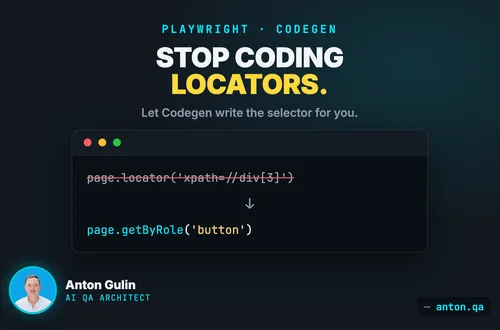
A locator (a pointer to an element) should match what a person sees on screen. Use getByRole, getByLabel, or getByText. These read like the page. They also survive a redesign of your HTML.
import { test, expect } from '@playwright/test';

test('user can sign in', async ({ page }) => {
  await page.goto('/login');
  await page.getByLabel('Email').fill('ada@example.com');
  await page.getByRole('button', { name: 'Sign in' }).click();
});
What AI agents get wrong: they reach for CSS or XPath (brittle path selectors) like page.locator('div.btn-primary > span'). Change one class name and the test breaks.
2. Use web-first assertions that wait for you
A web-first assertion (a check that auto-waits) retries until the page is ready. expect(locator).toBeVisible() waits on its own. You never add a fixed sleep.
import { test, expect } from '@playwright/test';

test('welcome message appears', async ({ page }) => {
  await page.goto('/dashboard');
  await expect(page.getByText('Welcome back')).toBeVisible();
});
What AI agents get wrong: they add await page.waitForTimeout(3000) (a hard pause). Hard waits are the top cause of flaky tests (tests that fail at random). Too short, the test fails. Too long, the suite crawls.
3. Keep every test isolated
Isolated means each test starts clean. No shared login. No leftover data from the test before. Playwright gives each test a fresh browser context (a clean session). Set up state in a hook, not across tests.
import { test, expect } from '@playwright/test';

test.beforeEach(async ({ page }) => {
  await page.goto('/login');
  await page.getByLabel('Email').fill('ada@example.com');
  await page.getByRole('button', { name: 'Sign in' }).click();
});

test('shows the account name', async ({ page }) => {
  await expect(page.getByRole('heading', { name: 'Ada Lovelace' })).toBeVisible();
});
What AI agents get wrong: they chain tests, where test 2 needs test 1 to run first. One failure then breaks the whole file.
4. Seed state through the API, not the UI
To test a page, you often need data first. A user, an order, a draft. Do not click through ten screens to make it. Send the data straight to your backend with the request fixture (a built-in HTTP client). It is faster and steadier.
import { test, expect } from '@playwright/test';

test('opens an existing project', async ({ page, request }) => {
  const res = await request.post('/api/projects', {
    data: { name: 'Apollo' },
  });
  expect(res.ok()).toBeTruthy();

  await page.goto('/projects');
  await expect(page.getByText('Apollo')).toBeVisible();
});
What AI agents get wrong: they build the data through the UI every time. The test gets long and slow, and a setup step fails for reasons that have nothing to do with the real check.
5. Do not lean on test IDs by default
A test ID (a tag added just for tests, like data-testid) works as a fallback. But reach for getByRole and getByLabel first. Those test what a real user can do. A test ID only proves an attribute exists.
import { test, expect } from '@playwright/test';

test('cart shows one item', async ({ page }) => {
  await page.goto('/cart');
  // Prefer a real role over a test id.
  await expect(page.getByRole('listitem')).toHaveCount(1);
});
What AI agents get wrong: they paste data-testid on everything. The tests pass even when the button has no label and a screen reader (assistive software) cannot find it. The test misses a real bug.
6. Turn on traces for the first retry
A trace (a full recording of the run) shows every step, the DOM, and the network. Set it to record only on the first retry of a failed test. You get the evidence for failures, and clean runs stay fast.
// playwright.config.ts
import { defineConfig } from '@playwright/test';

export default defineConfig({
  retries: 1,
  use: {
    trace: 'on-first-retry',
  },
});
What AI agents get wrong: they leave tracing off, or set trace: 'on' for every run. Off means no evidence when a test fails. Always-on slows the suite and fills your disk.
7. Run tests in parallel and shard them
Parallel means many tests run at once. Playwright does this by default. For one big file of independent tests, set parallel mode. To split a slow suite across machines, use sharding (run a slice per machine).
import { test, expect } from '@playwright/test';

test.describe.configure({ mode: 'parallel' });

test('loads home', async ({ page }) => {
  await page.goto('/');
  await expect(page).toHaveTitle(/Home/);
});
Split across three machines on CI (your build server):
npx playwright test --shard=1/3
What AI agents get wrong: they write tests that share a database row or a single user. Run those in parallel and they fight each other, so you get flaky tests.
8. Keep if and try out of your tests
A test should walk one clear path. No branching. If a test asks "is the button there? if so click it," it hides a bug. The button should always be there. Assert it.
import { test, expect } from '@playwright/test';

test('checkout button works', async ({ page }) => {
  await page.goto('/cart');
  // Assert the state. Do not guess it with an if.
  const checkout = page.getByRole('button', { name: 'Checkout' });
  await expect(checkout).toBeEnabled();
  await checkout.click();
});
What AI agents get wrong: they wrap clicks in if (await locator.isVisible()) to stop errors. That hides the real failure. A test that skips its own check still goes green.
9. Test what users see, not how it is built
Test the behavior, not the internals. Check the visible result. Do not check a CSS class, a state variable, or a function name. Those change when you refactor (rewrite the code), even though the app still works.
import { test, expect } from '@playwright/test';

test('shows a success message after submit', async ({ page }) => {
  await page.goto('/contact');
  await page.getByLabel('Message').fill('Hello');
  await page.getByRole('button', { name: 'Send' }).click();
  // Check the user-facing result, not an internal class.
  await expect(page.getByText('Thanks, we got your message')).toBeVisible();
});
What AI agents get wrong: they assert on class="is-active" or an exact HTML shape. The test breaks on every redesign, even when nothing real changed.
10. Define projects in your config
A project (a named test setup) in playwright.config.ts runs the same tests under different settings. Use projects to cover Chromium, Firefox, and WebKit (the three main browser engines). One config, full coverage.
// playwright.config.ts
import { defineConfig, devices } from '@playwright/test';

export default defineConfig({
  testDir: './tests',
  fullyParallel: true,
  retries: 1,
  use: { trace: 'on-first-retry' },
  projects: [
    { name: 'chromium', use: { ...devices['Desktop Chrome'] } },
    { name: 'firefox', use: { ...devices['Desktop Firefox'] } },
    { name: 'webkit', use: { ...devices['Desktop Safari'] } },
  ],
});
What AI agents get wrong: they hard-code one browser, or copy a config with no projects array. The suite then tests Chrome only, and a Safari-only bug ships to users.
11. Log in once, then reuse the session
Signing in through the form in every test is slow. It also makes every test depend on the login page.
Log in one time. Save the session to a file with storageState (the saved cookies and local storage). Every later test starts already signed in.
// auth.setup.ts: runs once, before the suite
import { test as setup } from '@playwright/test';

setup('sign in once', async ({ page }) => {
  await page.goto('/login');
  await page.getByLabel('Email').fill('ada@example.com');
  await page.getByLabel('Password').fill(process.env.TEST_PASSWORD!);
  await page.getByRole('button', { name: 'Sign in' }).click();
  await expect(page.getByRole('heading', { name: 'Dashboard' })).toBeVisible();
  await page.context().storageState({ path: 'playwright/.auth/user.json' });
});
Point your project at that file, and the tests open already signed in.
What AI agents get wrong: they write the full login into every single test. Fifty tests then run the same five steps fifty times. One change to the login form breaks all fifty at once.
12. Test the API directly when the screen is not the point
Not every check needs a browser. If you are testing what the server returns, ask the server.
Playwright ships a request client. It is faster than a page, and it does not break when the design changes.
import { test, expect } from '@playwright/test';

test('the API rejects a bad email', async ({ request }) => {
  const res = await request.post('/api/signup', {
    data: { email: 'not-an-email', password: 'hunter2hunter2' },
  });
  expect(res.status()).toBe(400);
  expect(await res.json()).toMatchObject({ field: 'email' });
});
What AI agents get wrong: they drive the whole thing through the browser. The agent fills a form and reads an error message to check a rule the server already enforces. That test is ten times slower and fails whenever the wording changes.
13. Keep page objects thin
A page object is a class that holds the locators for one screen. It stops you from repeating the same selector in twenty files.
Keep it to locators and simple actions. Do not put your checks inside it. The test itself should say what is true. A reader then sees the point without opening another file.
export class LoginPage {
  constructor(private page: Page) {}
  email = () => this.page.getByLabel('Email');
  submit = () => this.page.getByRole('button', { name: 'Sign in' });
  async signIn(email: string, password: string) { /* fill and click */ }
}
What AI agents get wrong: they bury assertions inside the page object. The test then reads await loginPage.verifyEverythingWorks() and tells you nothing. When it fails, you cannot see what was expected.
14. Pin the Playwright version and upgrade on purpose
Playwright ships often. A floating version means the browser under your tests can change overnight, without you asking.
Pin an exact version in package.json. Upgrade when you choose, and run the suite as part of that upgrade.
{ "devDependencies": { "@playwright/test": "1.62.1" } }
What AI agents get wrong: they write "@playwright/test": "^1.62.1". The caret allows any later 1.x. A green suite on Monday can go red on Friday because a browser updated, and nothing in your code changed.
The human still owns the standard
AI writes the first draft fast. That part is real, and it is useful. But the first draft copies patterns from old code on the internet. It adds hard waits. It clicks through the UI to seed data. It wraps fragile steps in if blocks so the run stays green.
A green suite that proves nothing is worse than no suite. It buys false trust.
So the workflow is simple. Let the agent write the draft. Then a human reads it against these 14 rules and fixes what the agent got wrong. The agent moves fast. The human keeps the tests honest. That is the job of an AI QA Architect.
Build the tests with AI. Then make them stable yourself.
Anton Gulin is the AI QA Architect, the first person to claim this title on LinkedIn. He builds AI-powered test automation systems where AI agents and human engineers collaborate on quality. Former Apple SDET (Apple.com / Apple Card pre-release testing). Find him at anton.qa or on LinkedIn.