·4 min read
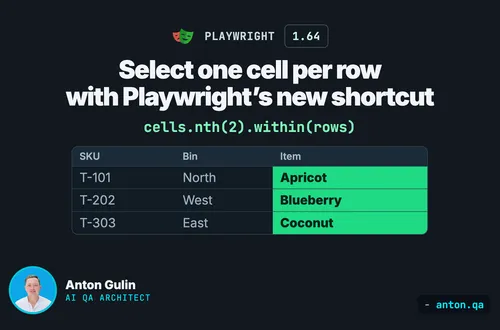
Select one cell per row with Playwright’s new shortcut
Select each row’s third table cell with Playwright 1.64 within(). Run the complete example and compare the result with a table-wide nth(2).
playwrighttestingjavascript
Published: · 4 min read
A practical, step-by-step guide to migrating your Selenium test suite to Playwright. Includes code comparison, common pitfalls, and a migration strategy that won't disrupt your team.

I've been using Selenium since 2015. It served me well at Apple and plenty of other companies. But after migrating a large suite to Playwright, I won't go back.
Here's how they compare:
Setup time:
Selenium: 30+ minutes
Playwright: 5 minutes
Auto-waiting:
Selenium: Manual (causes flaky tests)
Playwright: Built-in
Cross-browser:
Selenium: Needs separate drivers
Playwright: Bundled
Parallel testing:
Selenium: Requires Grid setup
Playwright: Built-in
Test execution:
Selenium: Slower
Playwright: 40-60% faster
Debugging:
Selenium: Stack traces only
Playwright: Trace viewer with recordings
If your Selenium tests are slow, flaky, or a pain to maintain, migration is worth it.
Don't rewrite everything at once. Follow this incremental approach:
Phase 1: New tests in Playwright
Stop writing new Selenium tests. All new tests go in Playwright.
Phase 2: Migrate critical paths first
Identify your highest-value tests (login, checkout, core features) and migrate those.
Phase 3: Gradual Selenium deprecation
As you touch Selenium tests for maintenance, migrate them. Eventually, the old suite goes to zero.
This approach minimizes risk and lets your team learn Playwright gradually.
You don't need to remove Selenium to start. Create a parallel Playwright project:
npm init playwright@latest -- --quiet
Your project structure becomes:
tests/
├── selenium/  # Existing Selenium tests
└── playwright/  # New Playwright tests
Both can run in CI simultaneously during transition.
Here's a side-by-side comparison of common operations:
Navigation:
Selenium (Java):
driver.get("https://example.com");
Playwright (TypeScript):
await page.goto('https://example.com');
Finding elements:
Selenium:
driver.findElement(By.id("username"));
driver.findElement(By.cssSelector(".submit-btn"));
driver.findElement(By.xpath("//button[text()='Submit']"));
Playwright:
page.locator('#username');
page.locator('.submit-btn');
page.getByRole('button', { name: 'Submit' });
Clicking:
Selenium:
driver.findElement(By.id("submit")).click();
Playwright:
await page.locator('#submit').click();
Or better:
await page.getByRole('button', { name: 'Submit' }).click();
Typing:
Selenium:
driver.findElement(By.id("email")).sendKeys("test@example.com");
Playwright:
await page.locator('#email').fill('test@example.com');
Or:
await page.getByLabel('Email').fill('test@example.com');
Waiting:
Selenium (the source of most flakiness):
WebDriverWait wait = new WebDriverWait(driver, Duration.ofSeconds(10));
wait.until(ExpectedConditions.visibilityOfElementLocated(By.id("result")));
Playwright (auto-waits by default):
Just interact, Playwright waits automatically
await page.locator('#result').click();
Or explicitly assert visibility:
await expect(page.locator('#result')).toBeVisible();
Assertions:
Selenium (with JUnit):
String title = driver.getTitle();
assertEquals("Expected Title", title);
Playwright:
await expect(page).toHaveTitle('Expected Title');
Screenshots:
Selenium:
File screenshot = ((TakesScreenshot) driver).getScreenshotAs(OutputType.FILE);
FileUtils.copyFile(screenshot, new File("screenshot.png"));
Playwright:
await page.screenshot({ path: 'screenshot.png' });
If you're using Page Object Model in Selenium, the pattern translates directly.
Selenium (Java):
public class LoginPage {
    private WebDriver driver;
    public LoginPage(WebDriver driver) {
        this.driver = driver;
    }
    public void login(String email, String password) {
        driver.findElement(By.id("email")).sendKeys(email);
        driver.findElement(By.id("password")).sendKeys(password);
        driver.findElement(By.id("submit")).click();
    }
}
Playwright (TypeScript):
export class LoginPage {
  constructor(private page: Page) {}
  async login(email: string, password: string) {
    await this.page.getByLabel('Email').fill(email);
    await this.page.getByLabel('Password').fill(password);
    await this.page.getByRole('button', { name: 'Sign in' }).click();
  }
}
The structure is almost identical. You're just swapping APIs.
This is where you get the biggest reliability win.
Remove all explicit waits:
In Selenium, you probably have code like:
WebDriverWait wait = new WebDriverWait(driver, 10);
wait.until(ExpectedConditions.elementToBeClickable(By.id("button")));
driver.findElement(By.id("button")).click();
In Playwright, just:
await page.locator('#button').click();
Playwright automatically waits for:
Playwright's CI setup is simpler than Selenium Grid.
GitHub Actions example:
name: Playwright Tests
on: [push, pull_request]
jobs:
  test:
    runs-on: ubuntu-latest
    steps:
      - uses: actions/checkout@v4
      - uses: actions/setup-node@v4
        with:
          node-version: 20
      - run: npm ci
      - run: npx playwright install --with-deps
      - run: npx playwright test
      - uses: actions/upload-artifact@v4
        if: failure()
        with:
          name: playwright-report
          path: playwright-report/
No Selenium Grid. No browser driver management. Just install and run.
1. Trying to rewrite everything at once
This is the number one cause of failed migrations. Use the incremental approach.
2. Copying Selenium's explicit waits
Don't translate WebDriverWait to waitForSelector. Trust Playwright's auto-waiting.
3. Keeping fragile locators
Migration is a chance to improve. Replace XPath and positional CSS with role-based locators.
4. Not training the team
Playwright has different patterns. Invest in a training session or pair programming during the first weeks.
Before declaring migration complete:
Based on my experience:
Small suite (under 50 tests): 1-2 weeks
Medium suite (50-200 tests): 1-2 months
Large suite (200+ tests): 3-6 months
The biggest factor isn't the number of tests. It's how tangled your Selenium architecture is. Clean Page Objects migrate fast. Spaghetti code requires refactoring.
On that project, after completing migration:
If you're planning a Selenium to Playwright migration and want guidance from someone who's done it multiple times, I can help. I offer consulting packages that include:
Get notified when I publish something new, and unsubscribe at any time.
·4 min read
Select each row’s third table cell with Playwright 1.64 within(). Run the complete example and compare the result with a table-wide nth(2).
·5 min read
Decide whether WebMCP affects your tests, then check website actions with Playwright 1.64.
·4 min read
Choose fields, getters, or methods for Playwright locators without confusing stored locators with stored elements.