·4 min read
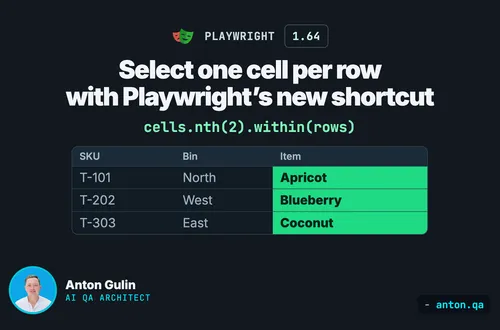
Select one cell per row with Playwright’s new shortcut
Select each row’s third table cell with Playwright 1.64 within(). Run the complete example and compare the result with a table-wide nth(2).
playwrighttestingjavascript
Published: · 4 min read
Your login helper exists twice: one that expects success, one that expects an error. Here is the options-object pattern that keeps one method, with Playwright code.

Your login helper exists twice. One version expects the dashboard. One version expects the error. Ninety percent of the two bodies is the same code. Here is the short answer. Keep one method per user action. Let an options object say what it waits for. The test still decides what the result means.
Last week I wrote about where test assertions belong. A reader came back with the harder version of the question. If business checks live in the test, how does one method serve both cases? Good question. This post is the answer.
Open any page object that is more than a year old. You will find this:
async login(user: string, pass: string) {
  await this.username.fill(user);
  await this.password.fill(pass);
  await this.submit.click();
  await this.page.waitForURL('**/dashboard');
}

async loginExpectingError(user: string, pass: string) {
  await this.username.fill(user);
  await this.password.fill(pass);
  await this.submit.click();
  await this.errorBanner.waitFor();
}
Two methods. Three identical lines each. One real difference: what the method waits for at the end.
Now the login form changes. Someone adds a "remember me" checkbox. You fix the first method. You forget the second. The negative test starts failing for a reason unrelated to the negative case.
That is the cost of the duplicate. Not ugliness. Drift.
The first fix everyone tries is a flag:
async login(user: string, pass: string, success: boolean) { ... }
Then the test reads like this:
await loginPage.login('anton', 'wrong-password', false);
False what? You have to open the page object to find out. And flags multiply. Six months later the same method takes three of them, and nobody can read the call site at all:
await loginPage.login('anton', 'pw', false, true, false);
A flag saves a method and costs a reader. Bad trade.
Playwright's own API solves this everywhere. Every action takes an optional options object with named keys:
await page.getByRole('button').click({ timeout: 5000, force: true });
You never pass a bare true to Playwright. You pass a name and a value. Do the same in your page objects:
type LoginOptions = { waitFor?: 'dashboard' | 'error' };

async login(user: string, pass: string, options: LoginOptions = {}) {
  const { waitFor = 'dashboard' } = options;
  await this.username.fill(user);
  await this.password.fill(pass);
  await this.submit.click();
  if (waitFor === 'dashboard') {
    await this.page.waitForURL('**/dashboard');
  } else {
    await this.errorBanner.waitFor();
  }
}
Two things make this work. The default keeps the common call short. The named key makes the rare call readable:
// happy path, unchanged
await loginPage.login('anton', 'correct-password');

// negative path, and you can read it without opening the class
await loginPage.login('anton', 'wrong-password', { waitFor: 'error' });
One method. One place to fix when the form changes.
The option is called waitFor, not expectSuccess. That is deliberate.
expectSuccess: false puts a judgment inside the page object. The class starts deciding what a correct login looks like. That breaks the rule from last week: business checks live in the test.
waitFor: 'error' only says which element the method should wait for before it returns. It is a timing instruction, not a verdict. The verdict stays where a reader expects it:
test('rejects a wrong password', async ({ loginPage }) => {
  await loginPage.login('anton', 'wrong-password', { waitFor: 'error' });
  await expect(loginPage.errorBanner).toHaveText('Wrong password');
});
Read that test aloud. It says what it does and what should be true. You never open the page object.
Sometimes the duplicate is not a duplicate. Keep separate methods when the steps themselves differ:
async loginWithPassword(user: string, pass: string) { ... }
async loginWithSso(user: string) { ... }
Different fields, different clicks, different waits. These are two user actions that happen to end in the same place.
The test: if the bodies differ by more than the final wait, keep them apart. If they differ only by the final wait, merge them.
And name methods after the action, never after the outcome. loginExpectingError names a result. login names what the user does. Results belong in the test name.
Apply it once to your login helper. Then look at your checkout helper, your search helper, and your upload helper. The same pair is usually hiding in all of them.
Anton Gulin is the AI QA Architect, the first person to claim this title on LinkedIn. He builds AI-powered test automation systems where AI agents and human engineers collaborate on quality. Former Apple SDET (Apple.com / Apple Card pre-release testing). Find him at anton.qa or on LinkedIn.
Get notified when I publish something new, and unsubscribe at any time.
·4 min read
Select each row’s third table cell with Playwright 1.64 within(). Run the complete example and compare the result with a table-wide nth(2).
·5 min read
Decide whether WebMCP affects your tests, then check website actions with Playwright 1.64.
·4 min read
Choose fields, getters, or methods for Playwright locators without confusing stored locators with stored elements.