·3 min read
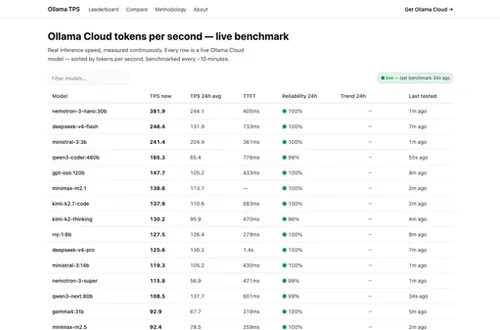
I measure how fast 42 LLMs actually answer. Here's the honest method.
An honest method for benchmarking LLM speed: tokens per second vs time to first token, across 42 Ollama Cloud models, measured every 10 minutes.
LLMbenchmarkingAI
Published: · 6 min read
A practical walkthrough for creating, testing, and installing production-grade OpenCode skills.

Out-of-the-box AI coding agents are powerful, but they don't know your team's conventions, your deployment process, or your documentation style. Skills let you encode that knowledge so the agent follows your workflows every time.
But creating skills has been guesswork. You write a SKILL.md file, test it manually in a session, maybe tweak the description, and hope it works. There's no feedback loop, no measurement, no way to know if a change actually improved things.
opencode-skill-creator changes this by providing a structured workflow for the full skill lifecycle: create, evaluate, optimize, benchmark, and install.
One command:
npx opencode-skill-creator install --global
This adds the plugin to your global OpenCode config. Restart OpenCode to activate it.
Verify the install:
ls ~/.config/opencode/skills/skill-creator/SKILL.md
Then ask OpenCode: Create a skill that helps with Docker compose files
You should see it use the skill-creator workflow and tools.
The skill-creator starts with an intake interview. It asks 3-5 targeted questions about what your skill should do:
Based on your interview, the skill-creator produces a draft SKILL.md with:
/tmp/opencode-skills/your-skill-name/
├── SKILL.md
├── agents/
├── references/
└── templates/
Review this draft. Make sure the description is accurate (it's the primary triggering mechanism) and the instructions reflect your actual workflow.
The skill-creator automatically generates test cases, realistic prompts that an OpenCode user would actually type:
{
"skill_name": "docker-compose",
"evals": [
{
"id": 1,
"prompt": "help me set up a compose file for my Node app with a Postgres database",
"expected_output": "Skill triggers and provides Docker compose guidance",
"should_trigger": true
},
{
"id": 2,
"prompt": "explain how Kubernetes deployments work",
"should_trigger": false
}
]
}
Good eval queries are realistic and specific, not abstract like "help with containers" but concrete like "ok so my boss just sent me this xlsx file (its in my downloads, called something like 'Q4 sales final FINAL v2.xlsx')..."
Review the eval set. Add or modify test cases that reflect your real usage.
The eval system runs each test case twice, once with the skill and once without (baseline). This measures whether the skill actually improves the output.
For each test case:
The skill-creator launches an HTML eval viewer:
Call skill_serve_review with:
workspace: /tmp/opencode-skills/your-skill-name-workspace/iteration-1
skillName: "your-skill-name"
The viewer shows:
Based on your feedback, the skill-creator improves the skill:
Even with perfect skill instructions, the skill won't trigger correctly if the description field isn't right. The description is what OpenCode reads to decide whether to load your skill.
The optimization loop:
"Optimize the description of my docker-compose skill"
This takes some time, grab a coffee while it runs.
Once you're satisfied with the skill and its description:
.opencode/skills/your-skill-name/SKILL.md, available only in this project~/.config/opencode/skills/your-skill-name/SKILL.md, available everywherecp -r /tmp/opencode-skills/your-skill-name/ .opencode/skills/your-skill-name/
cp -r /tmp/opencode-skills/your-skill-name/ ~/.config/opencode/skills/your-skill-name/
Only the final validated skill gets installed. All eval artifacts stay in the staging directory.
Here's what the full workflow looks like in practice:
~/.config/opencode/skills/docker-compose/npx opencode-skill-creator install --global
Then ask OpenCode to create a skill. That's it.
GitHub: https://github.com/antongulin/opencode-skill-creator
npm: https://www.npmjs.com/package/opencode-skill-creator
opencode-skill-creator is free and open source (Apache 2.0). Star it on GitHub. Install: npx opencode-skill-creator install --global
Get notified when I publish something new, and unsubscribe at any time.
·3 min read
An honest method for benchmarking LLM speed: tokens per second vs time to first token, across 42 Ollama Cloud models, measured every 10 minutes.
·7 min read
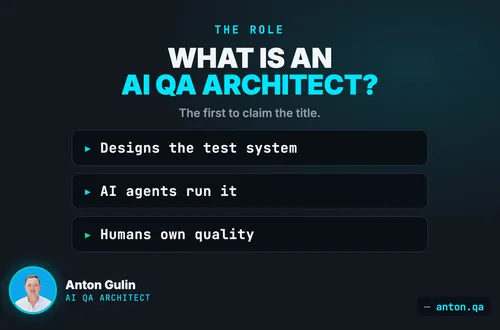
An AI QA Architect designs the test systems AI agents run on. Learn the role, architecture, skills, and MCP testing boundary.
·2 min read
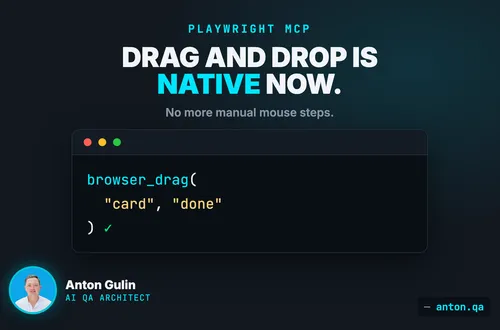
Native drag-and-drop in Playwright MCP cuts brittle mouse steps. Learn what changed, when to use it, and how QA teams should validate complex flows.